
The Smarter Way to Use AI #
If you’re planning on automating as much as you can, understanding API keys is essential for your AI automation journey.
Many AI tools and platforms offer two options: use their built-in credits (often expensive and expiring) or bring your own API key from providers like OpenAI, Google, or Anthropic. In this guide, I’ll show you why bringing your own key is almost always the better choice, and walk you through exactly how to get keys from the major AI providers.
Why Bring Your Own API Key? #
Credits Do NOT Expire #
When you purchase credits through third-party platforms or AI automation tools, those credits often come with expiration dates (30 days, 90 days, or at the end of your subscription). This means you’re racing against the clock to use what you’ve paid for.
With your own API key from providers like OpenAI, Anthropic, Google, or xAI, your credits never expire. You add $10, $20, or $100 to your account, and it stays there until you use it. No pressure, no waste.
Credits Are Very Cheap for Text Prompts #
The cost difference is significant. Here’s what you need to know:
Text prompts are negligible in cost – We’re talking fractions of a penny per request. For most automation workflows using GPT-4, Claude, or Gemini for text generation, you might spend $0.01 to $0.05 per complex prompt. Even heavy users rarely exceed $10-20 per month for text-only automations.
Images, voice, and video cost more – While text is cheap, multimodal AI (image generation with DALL-E, voice synthesis with ElevenLabs, video processing) costs significantly more. But even then, using your own keys is typically 50-80% cheaper than buying through intermediary platforms.
Example comparison:
- Third-party platform: $49/month for “unlimited” text + 100 image generations
- Your own keys: $5-15/month for similar text usage + pay-per-image ($0.02-0.08 each)
- For most solopreneurs and small business automations, bringing your own key means you’ll spend $5-20/month instead of $49-99/month.
How to Get Your API Keys #
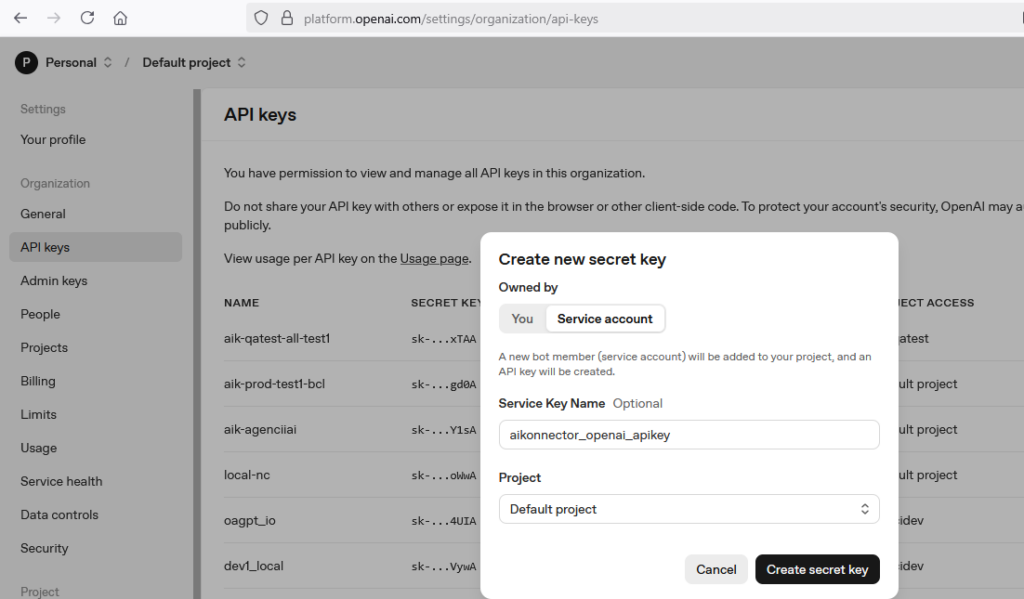
OpenAI (ChatGPT, GPT-4, DALL-E) #
Link: https://platform.openai.com/api-keys
Steps:
- Go to platform.openai.com and sign in (or create an account)
- Navigate to Settings → Organization → API keys in the left sidebar
- Click “+ Create new secret key”
- Name your key (example: `aikonnector_openai_apikey`)
- Select your default project or create a new one
- Click “Create secret key”
- Copy the key immediately (it won’t be shown again)
- Store it securely (password manager or environment variables)
Pricing: Pay-as-you-go. GPT-4o starts at $2.50 per 1M input tokens, $10 per 1M output tokens. New accounts often get $5 in free credits.
Google Gemini (Gemini Pro, Gemini Flash) #
Link: https://aistudio.google.com/apikey
Steps:
- Go to Google AI Studio
- Sign in with your Google account
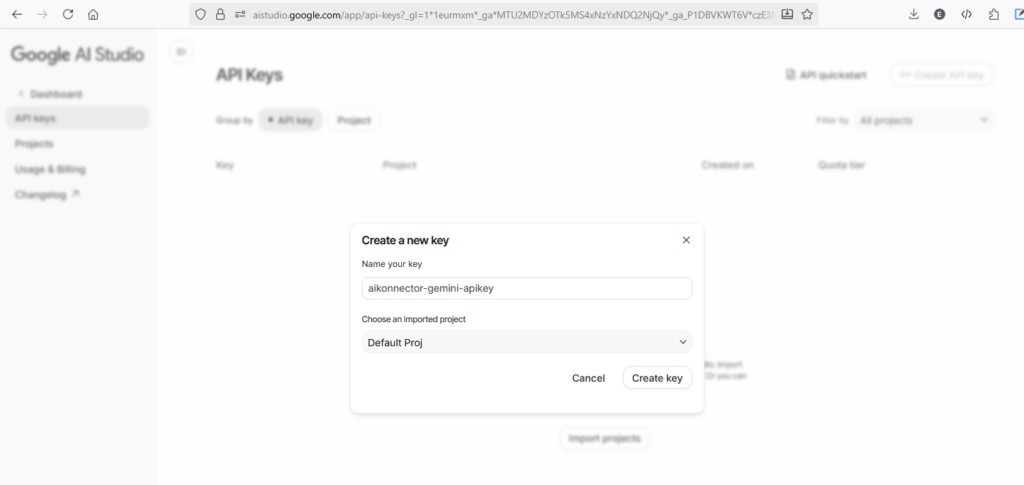
- Click “Get API Key” in the top navigation
- Click “Create API Key”
- Name your key (example: `aikonnector-gemini-apikey`)
- Choose an imported project or use the default project
- Click “Create key”
- Copy your API key and store it securely
Pricing: Extremely generous free tier (1,500 requests per day for Gemini 1.5 Flash). Paid tier starts at $0.075 per 1M input tokens.
Anthropic (Claude Sonnet, Claude Opus) #
Link: https://console.anthropic.com/settings/keys
Steps:
- Go to console.anthropic.com
- Sign in or create an account
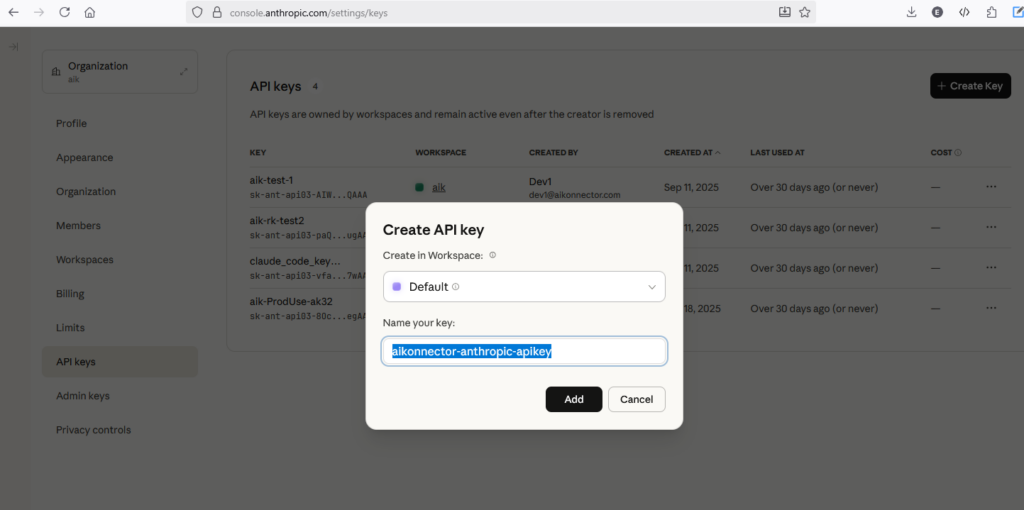
- Navigate to Settings → API keys in the left sidebar
- Click “+ Create Key” in the top right
- Select your workspace (usually “Default”)
- Name your key (example: `aikonnector-anthropic-apikey`)
- Click “Add”
- Copy the key (starts with `sk-ant-api03-…`)
- Store it securely
Pricing: Pay-as-you-go. Claude 3.5 Sonnet costs $3 per 1M input tokens, $15 per 1M output tokens. New accounts get $5 in free credits.
xAI (Grok) #
Link: https://console.x.ai/
Steps:
- Go to console.x.ai
- Sign in with your X (Twitter) account
- Navigate to API Keys in the dashboard
- Click “Create new API key”
- Name your key (example: `aikonnector-xai-apikey`)
- Click “Create”
- Copy the key and store it securely
Pricing: Pay-as-you-go. Grok-2 starts at $2 per 1M input tokens, $10 per 1M output tokens. Check their console for current free tier offerings.
OpenRouter (Multi-Model Access) #
Link: https://openrouter.ai/settings/keys
Steps:
- Go to openrouter.ai
- Sign in or create an account
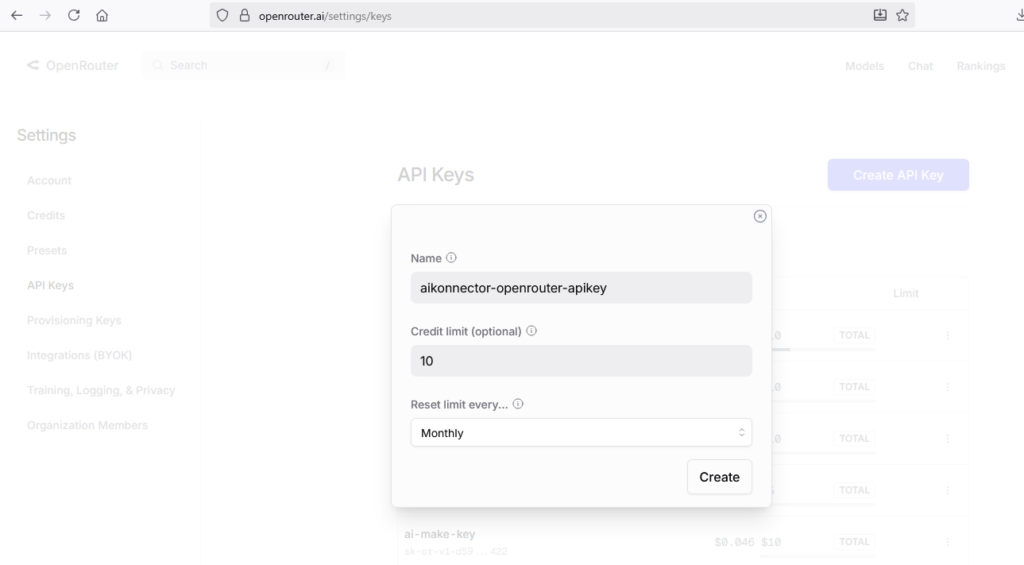
- Navigate to Settings → API Keys
- Click “Create API Key”
- Name your key (example: `aikonnector-openrouter-apikey`)
- Set optional credit limit and reset frequency (recommended: $10 monthly limit)
- Click “Create”
- Copy the key and store it securely
Pricing: You add credits to your OpenRouter account, then OpenRouter bills you at the provider’s rate plus a small markup (usually 10-20%). The convenience of one key for all models is worth the small premium for many users.
Best Practices for API Key Management #
- Never share your API keys – Treat them like passwords. Don’t commit them to GitHub or share them in screenshots.
- Use environment variables – In Make.com, n8n, or custom code, store keys as environment variables or in secure credential managers, never hardcoded in workflows.
- Set spending limits – Most providers let you set monthly spending caps. Start with $10-20 limits until you understand your usage patterns.
- Name your keys descriptively – Use names like `make-automation-openai-key` or `n8n-prod-claude-key` so you know which key is used where.
- Rotate keys periodically – Every 6-12 months, create new keys and retire old ones for security.
- Monitor usage – Check your provider dashboards monthly to spot any unexpected spikes or unauthorized usage.
Which Provider Should You Start With? #
If you’re just getting started with AI automation:
Start with Google Gemini – The free tier is extremely generous (1,500 requests/day), perfect for learning and testing workflows. Gemini 1.5 Flash is fast and surprisingly capable for most automation tasks.
Add OpenAI next – Once you need GPT-4 or DALL-E image generation, add $10 to an OpenAI account. GPT-4o is the gold standard for complex reasoning tasks.
Consider Anthropic for long context – Claude 3.5 Sonnet excels at analyzing long documents and maintaining context. If your automations involve processing PDFs, contracts, or research papers, Claude is worth the investment.
Try OpenRouter for flexibility – If you want to experiment with multiple models without managing multiple accounts, OpenRouter gives you access to everything through one key.
Final Thoughts #
Bringing your own API key is one of the smartest decisions you can make in your AI automation journey. You’ll save money, maintain control over your credits, and have direct access to the latest AI models without platform restrictions.
The setup takes 5 minutes per provider. The savings over a year can be hundreds or thousands of dollars compared to paying for intermediary platform credits.
Let us know if there are any specific AI/LLM providers you want to connect to.


